1440p vs 1080p for PS5: What Sony Supports, and When It Pays Off
Sony added 1440p output to the PS5 in 2022 and VRR at 1440p in 2023. Here is what that means for 1080p, 1440p and 4K monitors, mode by mode.
QUEST LOG 12 STEPS
MISSION BRIEFINGSony added 1440p output to the PS5 in 2022 and VRR at 1440p in 2023. Here is what that means for 1080p, 1440p and 4K monitors, mode by mode.
For 1440p vs 1080p for PS5, the answer depends on screen size: at 27 inches, 1440p is the sharper desktop choice, and at 24 inches, 1080p remains fine. On PS5, the output signal and a game's internal rendering resolution are not the same thing: selecting 1440p does not prove that every game renders natively at 1440p.
Since March 2023, Sony says VRR at 1440p needs an HDMI 2.1 VRR display and a supporting game. The one exception we found is the ASUS XG27ACS, an HDMI 2.0 monitor on which RTINGS's lab testing reports VRR with a PS5, so treat it as one lab-reported example with caveats, not a universal winner. For the general order of checks, start with our guide to choosing a gaming monitor.
Last verified: October 27, 2026, against Sony's PlayStation Blog posts and PS5 support page, ASUS's XG27ACS spec page and the public part of RTINGS's PS5 monitor page and XG27ACS review.
| You | Pick | Check |
|---|---|---|
| 27 inches, performance modes | 1440p, HDMI 2.1, VRR | The exact model's ports |
| 24 inches, or mostly 60 fps | 1080p | Nothing more; it is fine |
| Sharpest picture | 4K, HDMI 2.1 | Cable and size |
At a glance
- Our verdict (opinion): Buy a 27-inch 1440p monitor that a lab reports running 1440p at 120 Hz on a PS5, with VRR on most signals. HDMI 2.1 is the safe spec; the ASUS XG27ACS is the lab-reported exception on HDMI 2.0, so treat it as a budget route, not the textbook match. 1440p adds sharpness, not frames, and some games render below 1440p. On 24 inches, or if you mostly play 60 fps quality modes, 1080p is fine.
- Sony's timeline: 1440p output in 2022, VRR at 1440p in 2023; dates in the table below.
- VRR needs two things: an HDMI 2.1 display that supports VRR, and a game that supports VRR. Not every game does.
- Method: Analysis of Sony, ASUS and RTINGS pages. NexaRig has not tested these monitors on a PS5.
What Sony says about 1440p, with dates
Sony's pages give a clear sequence, and older articles that say the PS5 can't output 1440p predate it.
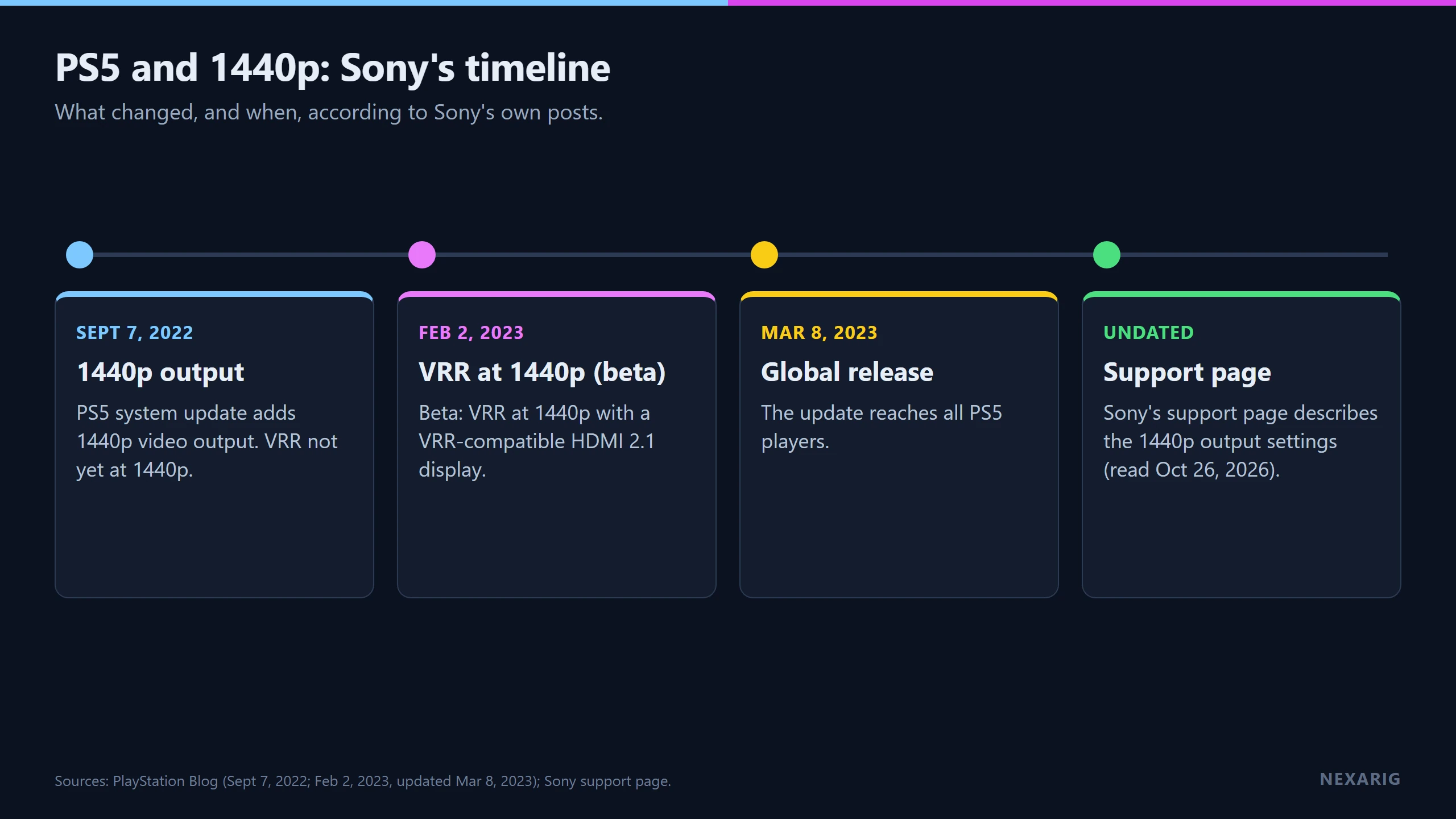
Drawn by NexaRig from PlayStation Blog posts (2022, 2023) and Sony's support page.
| Date | What changed |
|---|---|
| September 7, 2022 (PlayStation Blog) | Adds 1440p video output. Requires a TV or monitor supporting 1440p/60 Hz, or 1440p/60 Hz and 120 Hz. At that point VRR supported 1080p and 4K but not 1440p. |
| February 2, 2023 (PlayStation Blog; beta announcement, post updated March 8, 2023 for the global release) | Adds VRR at 1440p with a VRR-compatible HDMI 2.1 display, in games that support VRR. Test with Settings, Screen and Video, Video Output, Test 1440p Output. |
| Undated, read October 26, 2026 (Sony support page) | Says you can test 1440p for SDR/HDR, 60 Hz/120 Hz and VRR if your display supports it. Says "Results vary depending on the TV you're using." Disable 120 Hz output if you see video problems. |
The 2022 post also notes that results may vary depending on the game. The support page carries no revision date, so treat it as current only as of our read.
One model note: Sony's support page restricts only 8K output, PS4 image enhancement and PSSR image quality to the CFI-7000 model group (a console model code Sony uses on that page), and lists no such limit for 1440p, 120 Hz or VRR. For Pro details, see PS5 vs PS5 Pro.
1440p vs 1080p by PS5 mode
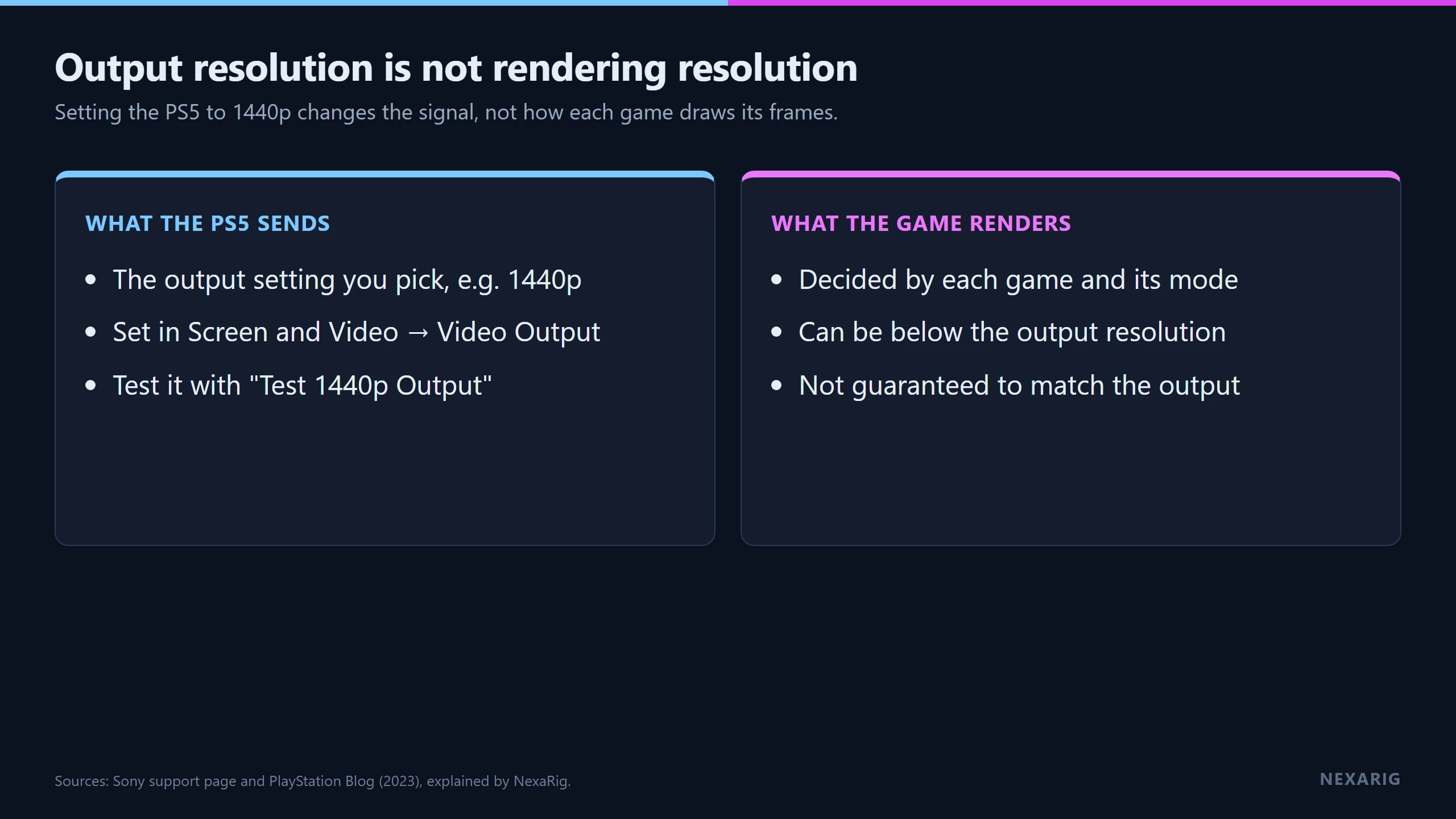
Drawn by NexaRig from Sony's support page and PlayStation Blog (2023).
Decide by the mode you actually play. Many PS5 games offer a higher-quality mode at 60 fps and a performance mode at up to 120 fps, but not all do, and not all support VRR.
In 60 Hz modes, both resolutions work, and 1440p mainly adds density, which matters more at 27 inches. In 120 Hz modes, both work too. Check the monitor's HDMI limit at 1440p, because an HDMI 2.0 input may cap below 120 Hz. VRR works at 1080p (Sony, 2022) and at 1440p (since March 2023, with an HDMI 2.1 VRR display), and only in games that support it.
One caution: sending 1440p to the monitor is not the same as a game rendering at 1440p. Sony's output setting controls what the console sends to the display. Some games render below the output resolution, so a 1440p monitor does not guarantee native 1440p detail. Test with the console's own menu and read each game's mode notes.
24 inches vs 27 inches
What the console sends to the screen is what this article checks. Photo: Amar Preciado / Pexels (cropped by NexaRig)
Pick the size by desk depth and sharpness, then match the resolution. Pixel density below is our own arithmetic, not a manufacturer spec.
| Screen | Pixels per inch | Reading |
|---|---|---|
| 27-inch 1080p | about 82 | The softest of these three |
| 24-inch 1080p | about 92 | Can still look clean at arm's length |
| 27-inch 1440p | about 109 | The logical pair at 27 inches |
The full density table and viewing distances are in our guide to choosing a gaming monitor.
What about 4K?
A 4K monitor is a valid alternative if you want the sharpest picture and have the HDMI 2.1 input. Sony's support page says the PS5 supports the HDMI 2.1 specification and 4K at 120 Hz, and asks for the included cable or an Ultra High Speed cable for that output. By our arithmetic a 27-inch 4K screen is about 163 pixels per inch, against about 109 for 27-inch 1440p. In our opinion, from desk distance the 1440p-to-4K step is less visible than 1080p-to-1440p; this is not a measured claim. Check the exact model's ports yourself.
Who should pick which
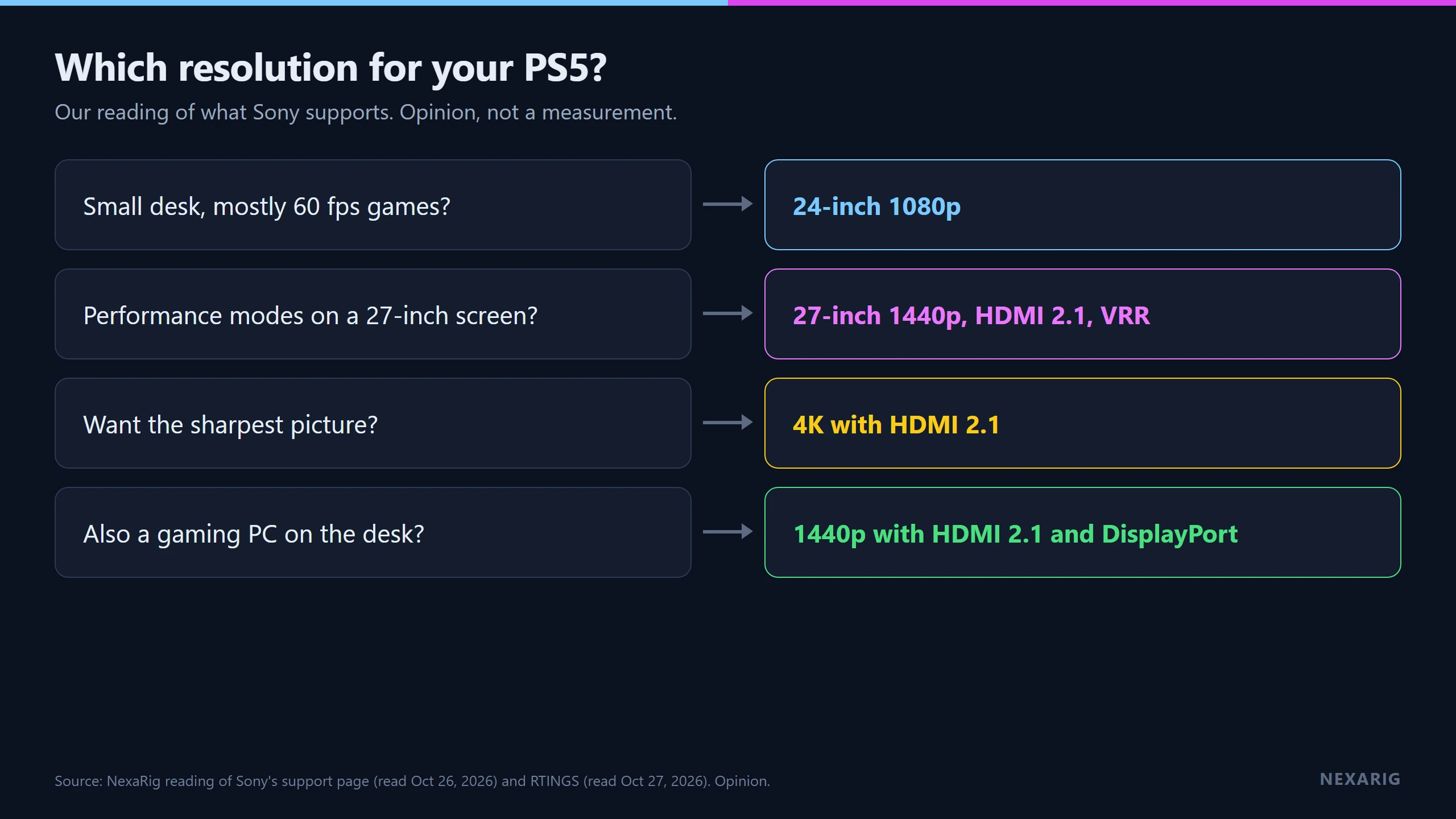
NexaRig reading of Sony's support page and RTINGS. Opinion.
| You | Pick | Why | Compromise |
|---|---|---|---|
| Small desk, mostly 60 fps play | 24-inch 1080p | Clean at that size | Less future headroom |
| Play performance modes, 27 inches | 27-inch 1440p, HDMI 2.1, VRR (or a lab-reported exception) | HDMI 2.1 is the safe spec for Sony's 1440p/120 Hz and VRR path | Check the exact model's ports |
| Want the sharpest picture | 4K with HDMI 2.1 | Sony supports 4K at 120 Hz | Price, size, cable |
| Also use a PC | 1440p with HDMI 2.1 and DisplayPort | One screen, both machines | Some models differ by port |
One 1440p example, with caveats
If the table points you to 27-inch 1440p, here is one model to read against those checks: the ASUS ROG Strix XG27ACS, a 27-inch, 1440p IPS monitor rated at 180 Hz.
| Source | What it says |
|---|---|
| ASUS (maker) | One HDMI (v2.0) port and Adaptive-Sync, not HDMI 2.1. |
| RTINGS, best-monitors-for-PS5 page (updated October 14, 2026) | 4K at 60 Hz and 1440p at 120 Hz with the PS5; VRR with most signals but not at 4K 60 Hz; rated poor in HDR. |
| RTINGS, review (October 4, 2024; test bench updated October 7, 2026) | Low contrast. |
| Still open | We did not test it on a PS5, and Sony's own wording asks for an HDMI 2.1 VRR display, so confirm the behavior on the exact unit. |
Bottom line: it is a 1440p/120 Hz example that sits on the HDMI 2.0 side of the question, with a lab test behind it. It is not a winner.
RTINGS gives the XG27ACS a "Cheap" label on its PS5 list (updated October 14, 2026); no prices checked. Dell's earlier Alienware AW2725DM has been replaced by the AW2726DM, a QD-OLED model, according to RTINGS. For 4K models with HDMI 2.1 ports, and for PlayStation's own monitor, see best monitor for PS5.
Who should skip a new monitor
- You game on a 4K TV with HDMI 2.1. It already handles Sony's 4K 120 Hz path.
- Your games run at 60 fps. Moving to 1440p adds density, not frame rate.
- Your current screen has HDMI 2.1 and VRR at 1080p. Run Sony's Test 1440p Output on whatever you own before replacing it.
How we researched this
On October 26 and 27, 2026 we read the Sony sources listed below, ASUS's XG27ACS spec page and the public parts of RTINGS's PS5 monitor page and XG27ACS review (members-only results were not read). Pixel density is our own calculation. We did not test any monitor on a PS5, and we did not check other makers' specifications, prices or stock.
FAQ
Does PS5 support 1440p?
Yes. Sony added 1440p output in the system update announced September 7, 2022. The display must support 1440p/60 Hz, or 1440p/60 Hz and 120 Hz.
Does PS5 support VRR at 1440p?
Yes, since the global rollout in March 2023, with a VRR-compatible HDMI 2.1 display and a game that supports VRR.
Is 1440p better than 1080p for PS5?
It depends on mode and size. For 120 Hz modes on a 27-inch screen, 1440p with HDMI 2.1 and VRR is a good fit. For small screens at 60 fps, 1080p is reasonable.
Do I need HDMI 2.1 for 1440p on PS5?
For 1440p output alone, Sony requires a display with 1440p/60 Hz support. For VRR at 1440p, Sony requires an HDMI 2.1 VRR-compatible display. Third-party testing is less clear-cut: RTINGS reports VRR working with a PS5 on most signals, though not at 4K 60 Hz, on the XG27ACS, which has an HDMI 2.0 port, so check the exact model.
Limitations and points to verify
- Sony's support page is undated and can change; this page reflects our October 26, 2026 read.
- Results vary by display and by game; use the console's Test 1440p Output.
- The XG27ACS's stock, seller and listing details change, and ASUS's page does not state PS5 compatibility.
Sources
- PlayStation Blog, "New PS5 system software update is out globally today," September 7, 2022, accessed October 26, 2026. https://blog.playstation.com/2022/09/07/new-ps5-system-software-update-is-out-globally-today/
- PlayStation Blog, "PS5 system software update rolls out globally today" (originally "PS5 beta introduces Discord voice chat, VRR support for 1440p and more"), February 2, 2023 (updated March 8, 2023), accessed October 26, 2026. https://blog.playstation.com/2023/02/02/ps5-beta-introduces-discord-voice-chat-vrr-support-for-1440p-and-more/
- Sony Interactive Entertainment, "How to change PS5 console resolution" (support page), accessed October 26, 2026. https://www.playstation.com/en-us/support/hardware/ps5-4k-resolution-guide/
- ASUS, "ROG Strix XG27ACS" (specifications), accessed October 27, 2026. https://rog.asus.com/monitors/27-to-31-5-inches/rog-strix-xg27acs/spec/
- RTINGS, "The 6 Best Monitors For PS5/PS5 Pro of 2026" (updated October 14, 2026), accessed October 27, 2026. https://www.rtings.com/monitor/reviews/best/ps5
- RTINGS, "ASUS ROG Strix XG27ACS Review" (reviewed October 4, 2024; test bench updated October 7, 2026), accessed October 27, 2026. https://www.rtings.com/monitor/reviews/asus/rog-strix-xg27acs
- RTINGS, "Dell Alienware AW2726DM Review" (reviewed May 12, 2026), accessed October 27, 2026. https://www.rtings.com/monitor/reviews/dell/alienware-aw2726dm
- RTINGS, "Dell Alienware AW2725DM Review" (reviewed February 18, 2026), accessed October 27, 2026. https://www.rtings.com/monitor/reviews/dell/alienware-aw2725dm
This article is based on sourced research, without direct testing by NexaRig. How NexaRig labels its articles.
NEXT // CONTINUE YOUR RUN